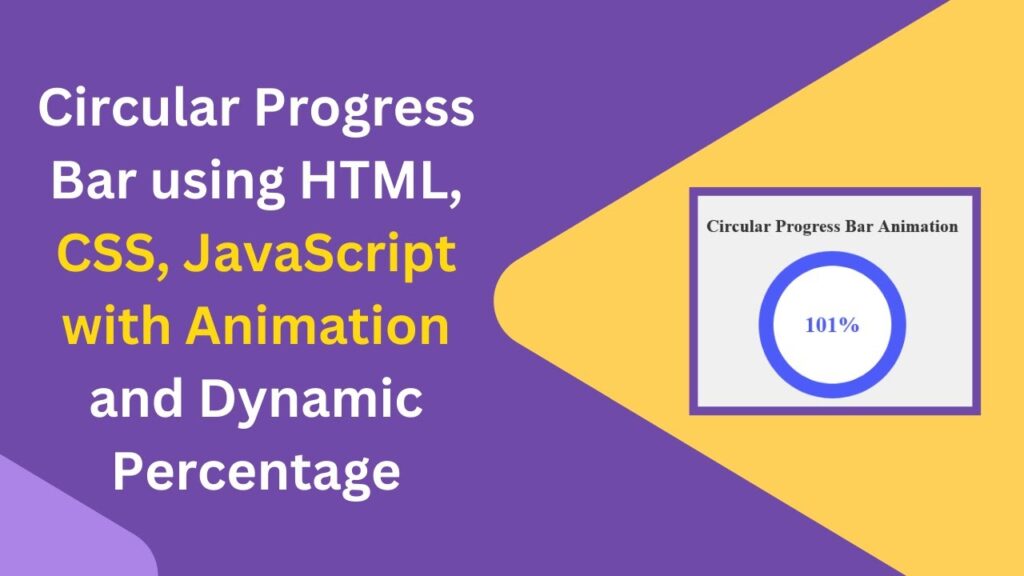
A circular progress bar is a visually appealing way to represent progress in percentages. In this tutorial, you’ll learn how to create a dynamic and animated circular progress bar using HTML, CSS, and JavaScript. This effect is perfect for dashboards, loading indicators, and interactive UI elements.
What You’ll Learn
✅ How to create a circular progress bar using HTML and CSS 🛠️
✅ Styling the progress circle and percentage display for a modern look 🎨
✅ Animating the progress with JavaScript for real-time updates ⏱️
✅ Customizing the progress bar’s design and speed to fit your needs ⚡
✅ Making the progress bar fully interactive with dynamic updates 🖱️
Step 1: HTML Structure
Create a simple structure to hold the circular progress bar and the percentage text.
<!DOCTYPE html>
<html lang="en">
<head>
  <meta charset="UTF-8">
  <meta name="viewport" content="width=device-width, initial-scale=1.0">
  <title>Circular Progress Bar</title>
  <style>
    body, html {
      margin: 0;
      padding: 0;
      height: 100%;
      display: flex;
      justify-content: center;
      align-items: center;
      background-color: #f0f0f0;
      flex-direction: column;
    }

    h1 {
      font-size: 24px;
      color: #333;
      margin-bottom: 20px;
    }

    .progress-wrapper {
      position: relative;
      width: 200px;
      height: 200px;
      border-radius: 50%;
      background: conic-gradient(#4d5bf9 calc(var(--progress) * 1%), #dcdfe6 0);
      display: flex;
      justify-content: center;
      align-items: center;
    }

    .progress-wrapper::before {
      content: '';
      position: absolute;
      width: 160px;
      height: 160px;
      border-radius: 50%;
      background-color: #fff;
      top: 50%;
      left: 50%;
      transform: translate(-50%, -50%);
      z-index: 1;
    }

    .percentage {
      position: absolute;
      font-size: 30px;
      color: #4d5bf9;
      font-weight: bold;
      z-index: 2;
    }
  </style>
</head>
<body>
  <h1>Circular Progress Bar Animation</h1>
  <div class="progress-wrapper" style="--progress: 75;">
    <div class="percentage">75%</div>
  </div>

  <script>
    let progress = 0;
    const progressWrapper = document.querySelector('.progress-wrapper');
    const percentageText = document.querySelector('.percentage');

    function updateProgress() {
      if (progress <= 100) {
        progress++;
        progressWrapper.style.setProperty('--progress', progress);
        percentageText.textContent = `${progress}%`;
      }
    }

    setInterval(updateProgress, 50); // Update progress every 50ms
  </script>
</body>
</html>
Step 2: Explanation
HTML:
- The
divwith the class.progress-wrapperis the container for the circular progress. - Inside the container, the
.percentagedisplays the numeric progress.
CSS:
- The
conic-gradientproperty is used to create the circular effect dynamically. - The
--progressCSS variable determines how much of the circle is filled. - A pseudo-element (
::before) is used to create the inner white space, making it look like a ring.
JavaScript:
- The script updates the
--progressvariable dynamically from 0 to 100. setInterval(updateProgress, 50);gradually increases the progress value.
Demo Video & Code Repository
🎥 Watch the tutorial video here:
💻 Download the full source code from GitHub:
GitHub Repository
Conclusion
By following this tutorial, you’ve successfully created a stylish, animated circular progress bar using HTML, CSS, and JavaScript. This effect is perfect for enhancing user engagement on dashboards, forms, and interactive web applications.
Try customizing the colors, size, and speed to match your project requirements. If you found this tutorial helpful, don’t forget to like, comment, and subscribe to Madras Academy for more web development tips and tutorials! 🚀
#HTML #CSS #JavaScript #WebDesign #Animation #ProgressBar #WebDevelopment #FrontendDevelopment #TechTutorial