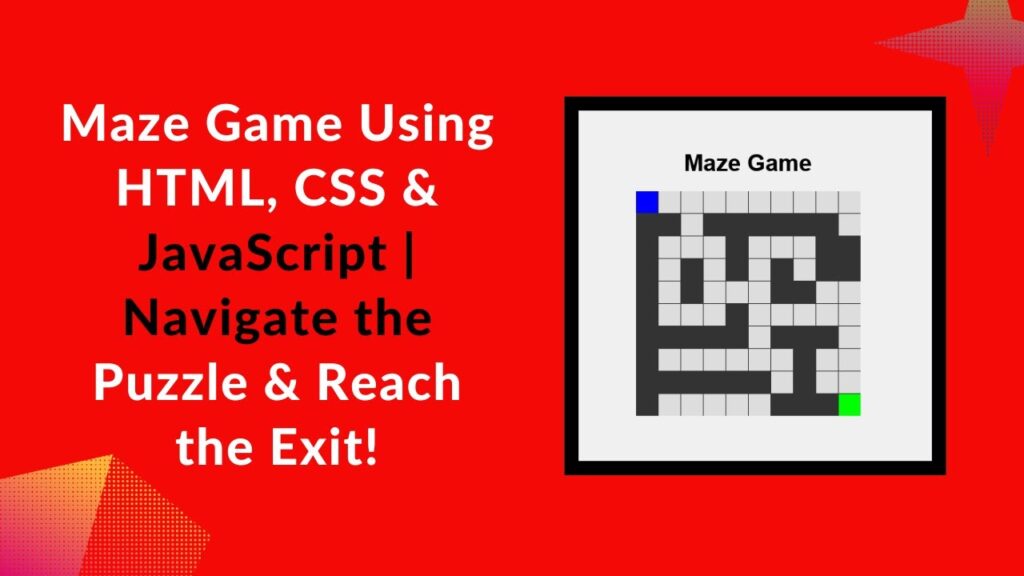
Want to create a fun and interactive game using just HTML, CSS, and JavaScript? In this tutorial, we’ll walk you through building a simple Maze Game where the player navigates through a grid-based maze using keyboard controls while avoiding walls and reaching the exit. This is a great project to sharpen your JavaScript event handling, grid layouts, and game logic skills. Let’s get started! 🎮
What You’ll Learn
✅ How to create a grid-based maze layout using HTML & CSS 🏗️
✅ Implement keyboard controls to move the player 🎮
✅ Use JavaScript to detect walls and prevent movement 🚧
✅ Check for game completion when the player reaches the exit ✅
✅ Enhance the game with animations and customization options 🎨
Project Overview
The game consists of a 10×10 grid where the player starts at the top-left corner (0,0) and must navigate to the bottom-right corner (9,9). The walls block movement, and the player can move using the WASD keys.
Code Implementation
1️⃣ HTML Structure
We define a simple grid-based maze using a <div> container. The player and exit points are dynamically assigned within the grid.
<!DOCTYPE html>
<html lang="en">
<head>
    <meta charset="UTF-8">
    <meta name="viewport" content="width=device-width, initial-scale=1.0">
    <title>Maze Game</title>
    <link rel="stylesheet" href="style.css">
</head>
<body>
    <h1>Maze Game</h1>
    <div class="maze" id="maze"></div>
    <script src="script.js"></script>
</body>
</html>
2️⃣ CSS Styling
The CSS styles define the maze structure, walls, player, and exit.
body {
    font-family: Arial, sans-serif;
    display: flex;
    flex-direction: column;
    justify-content: center;
    align-items: center;
    height: 100vh;
    margin: 0;
    background-color: #f0f0f0;
}

.maze {
    display: grid;
    grid-template-columns: repeat(10, 30px);
    grid-template-rows: repeat(10, 30px);
    gap: 1px;
    background-color: #333;
}

.cell {
    width: 30px;
    height: 30px;
    background-color: #ddd;
}

.wall {
    background-color: #333;
}

.player {
    background-color: #00f;
}

.exit {
    background-color: #0f0;
}
3️⃣ JavaScript Game Logic
The JavaScript file handles maze rendering, player movement, and win condition detection.
const mazeData = [
    [1, 0, 0, 0, 0, 0, 0, 0, 0, 0],
    [1, 1, 0, 1, 1, 1, 1, 1, 1, 0],
    [1, 0, 0, 0, 1, 0, 0, 0, 1, 1],
    [1, 0, 1, 0, 1, 0, 1, 0, 1, 1],
    [1, 0, 1, 0, 0, 0, 1, 1, 0, 0],
    [1, 0, 0, 0, 1, 0, 0, 0, 0, 0],
    [1, 1, 1, 1, 1, 0, 1, 1, 1, 0],
    [1, 0, 0, 0, 0, 0, 0, 1, 0, 0],
    [1, 1, 1, 1, 1, 1, 0, 1, 0, 0],
    [1, 0, 0, 0, 0, 0, 1, 1, 1, 0]
];

const player = { x: 0, y: 0 };
const exit = { x: 9, y: 9 };
const mazeElement = document.getElementById('maze');

function renderMaze() {
    mazeElement.innerHTML = '';
    for (let i = 0; i < mazeData.length; i++) {
        for (let j = 0; j < mazeData[i].length; j++) {
            const cell = document.createElement('div');
            cell.classList.add('cell');

            if (mazeData[i][j] === 1) cell.classList.add('wall');
            if (player.x === j && player.y === i) cell.classList.add('player');
            if (exit.x === j && exit.y === i) cell.classList.add('exit');

            mazeElement.appendChild(cell);
        }
    }
}

function movePlayer(event) {
    let newX = player.x;
    let newY = player.y;

    if (event.key === 'w' && player.y > 0 && mazeData[player.y - 1][player.x] !== 1) newY--;
    if (event.key === 'a' && player.x > 0 && mazeData[player.y][player.x - 1] !== 1) newX--;
    if (event.key === 's' && player.y < mazeData.length - 1 && mazeData[player.y + 1][player.x] !== 1) newY++;
    if (event.key === 'd' && player.x < mazeData[0].length - 1 && mazeData[player.y][player.x + 1] !== 1) newX++;

    player.x = newX;
    player.y = newY;

    if (player.x === exit.x && player.y === exit.y) {
        alert('You Win!');
        player.x = 0;
        player.y = 0;
    }
    renderMaze();
}

window.addEventListener('keydown', movePlayer);
renderMaze();
Play and Customize 🎨
- Try changing the maze layout by modifying
mazeData. - Customize the player and exit colors.
- Add animations for a smoother experience.
Watch the Video Tutorial 📺
Check out the full tutorial on YouTube:
Get the Source Code 🖥️
Access the complete source code on GitHub: GitHub Repository
Conclusion
By following this tutorial, you have successfully built a simple Maze Game using HTML, CSS, and JavaScript. Feel free to experiment and add new features like timer, sound effects, or levels. If you enjoyed this project, like, share, and subscribe for more exciting web development tutorials! 🚀🔥
#HTML #CSS #JavaScript #MazeGame #WebDevelopment #GameDevelopment #Coding #FrontendDevelopment #InteractiveGame #JavaScriptGames 🎯🎮